
Include rebates in the evaluation
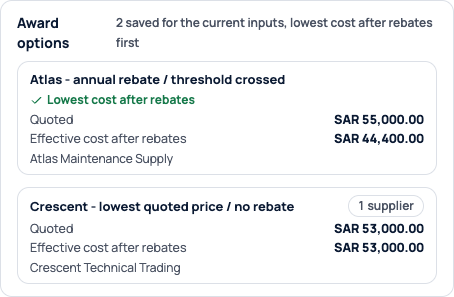
Saved comparisons show each offer’s quoted cost and its effective cost after rebates side by side, and your recommendation rules can rank on the effective cost.
Rebate Engine Add-on
The Rebate Engine applies your approved supplier rebate terms in the quote comparison, then tracks accruals, claims and settlements. In the product it is called Rebate Management.
In this example Atlas quotes 2,000 SAR more than Crescent. The award takes your purchases with Atlas past a rebate threshold in an agreement you already hold, so its effective cost drops to 44,400 SAR.
| Offer | Quoted cost | Rebate effect | Effective cost |
|---|---|---|---|
| Crescent Technical Trading | 53000.00 SAR | 0 SAR | 53000.00 SAR |
| Atlas Maintenance Supply | 55000.00 SAR | 10600.00 SAR | 44400.00 SAR |
The event owner picks one of two modes, and it is fixed once suppliers respond.
Saved comparisons show each offer’s quoted cost and its effective cost after rebates side by side, and your recommendation rules can rank on the effective cost.
Ranking uses the quoted cost. We still calculate the rebate forecast and keep it for tracking once the award is made.
Actual Sorvation interface. Illustrative demonstration data.
Actual Sorvation interface. Illustrative demonstration data.
Transaction, flat, retrospective, marginal, growth and threshold rebates, each with its own scope, conditions and rounding.
Amounts are calculated in exact decimals using your company’s precision and rounding method.
We compare your position with and without the proposed award, so a threshold crossed by this award is counted correctly.
An approved award reserves its forecast, so a threshold uplift counts toward one award.
Enter the agreement as structured terms, attach the signed original and have a second person review it before it goes live.
Qualifying purchases and credits accrue under the approved tiers, and duplicates are blocked.
Before an amendment is approved, you can preview what it does to accruals and to any over-claim.
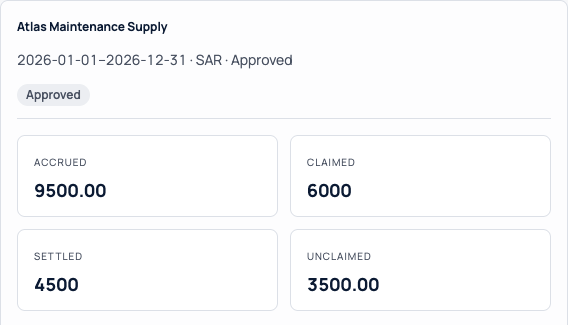
Prepare claims to the supplier, record each settlement and see what is still outstanding.
Add it to your Sorvation subscription. It works in the same events, with the same suppliers and approval routes.
Yes. Set the event to “Track rebates after award only”, and the comparison and ranking will use the quoted cost.
A forecast rebate never lowers the approval level an award needs.
Prepare each claim to the supplier, record each settlement against its agreement and see what is outstanding. Payments run through your finance process.
Rebates your company earns from suppliers on its purchases. Terms outside the six supported types are flagged as unverified for your team to review.
We use a sample agreement and show it in the comparison and in tracking after award.